When you want to see the list of Recurring Transactions for specific Business Partners when you want to execute too many transaction lists from various BPs. You can open it by starting the BP menu and then clicking the button below saying “You can too”
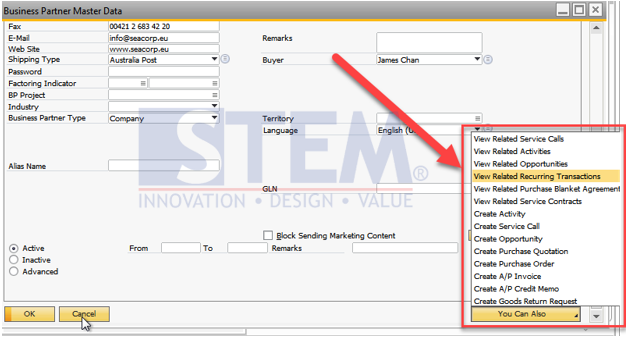
Then select “View Related Recurring Transactions”
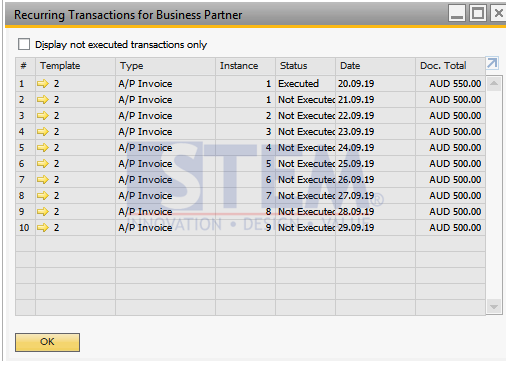
A window will appear as below
You can also filter again to see only transactions with “Not Executed” status by checking “Display not executed transaction only”
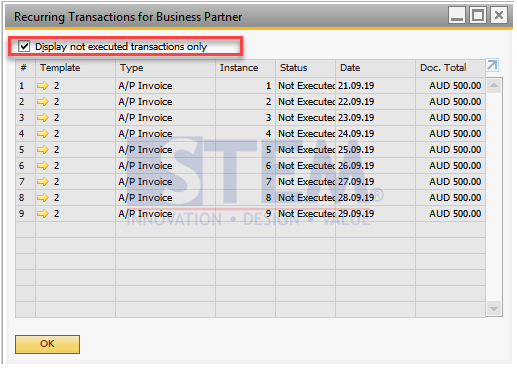
After checking, the list that appears is only transactions that have not been executed.
Also read relevant SAP Business One Tips:
- Set Default Currency & Hide All Currencies in SAP B1
- How to Set Default Warehouse in SAP B1 (Part 2)
- Turn a Document List into a Chart in SAP Business One Web Client
- How to Deactivate a Warehouse in SAP Business One
- How to Hide Inactive Contact Persons in SAP Business One
- Set Search Result View in Choose From List SAP B1